
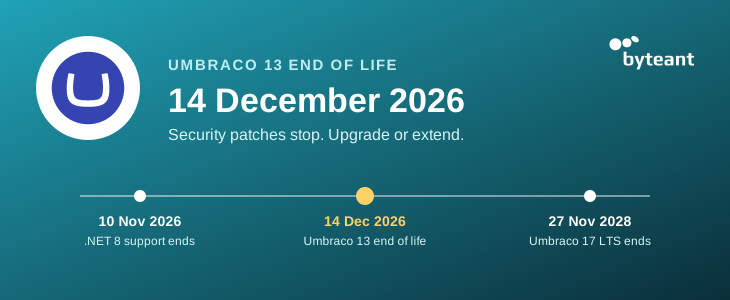
Umbraco 13 end of life is on 14 December 2026. From that day, Umbraco stops releasing security fixes for it. Your website keeps working, but new security holes will no longer be closed.
Umbraco 13 stops getting security fixes and support from Umbraco HQ, the company behind Umbraco. Nothing switches off that day. Visitors see the same site, and your editors use the same backoffice, the admin area where they edit pages.
The change is in what happens next. If someone finds a security hole in Umbraco 13 after that date, Umbraco won't fix it.
Sites on Umbraco Cloud, Umbraco's own hosting, follow the same date. The site keeps running, but Cloud stops applying security patches to it. Umbraco 13 projects can stay on Cloud with paid extended support (XLTS) until 14 December 2028. After that they move to separate hosting, which closes on 14 December 2029.
Umbraco 13 is a long-term support (LTS) version, which means three years of updates. Those three years end on 14 December 2026, as Umbraco's Umbraco 13 end-of-life page sets out.
The site carries on working, but the risk grows with every month. Each new security hole stays open, and Umbraco advises against running version 13 after end of life.
The layer underneath is already unsupported. Umbraco 13 runs on .NET 8, Microsoft's framework for web applications, and Microsoft stopped fixing it on 10 November 2026 (see its support policy). The only supported way to a newer .NET is a newer Umbraco.
It can also come up outside IT. Security audits, client contracts and cyber insurance forms often ask whether your software is supported. For Umbraco 13, from 14 December the honest answer is no.
There are three, and most sites should upgrade to Umbraco 17.
Umbraco 17 LTS is the current long-term version, supported until 27 November 2028. Your pages, content and images move across, and editors keep working the same way. Anything custom built into the old admin area has to be rebuilt, and that mostly decides the cost.
XLTS (extended long-term support) is a paid service from Umbraco that keeps security fixes coming after end of life. You buy 6, 12 or 24 months, and the cover has to run without gaps. It covers security fixes only, the price isn't published, and the Umbraco 13 XLTS page doesn't say whether it covers .NET 8.
XLTS buys time, nothing more. When it runs out, the upgrade is still waiting.
For an older site with a lot of custom work, a fresh build can cost less than carrying the old setup forward. It's also the natural choice if a redesign was coming anyway. Umbraco's own guide to going from 13 to 17 suggests this route for older, complex projects.
It mostly depends on how much custom work your site has.
Don't upgrade to Umbraco 18. It's a short-term version, supported only until 25 June 2027, and you would have to upgrade to 17 first to reach it anyway.
A standard upgrade from Umbraco 13 costs €3,990 and takes 2–3 weeks. Every one starts with a free readiness audit, which tells you your version, what needs to change and a fixed price.
| Package | Price | Time | What you get |
|---|---|---|---|
| Readiness audit | Free | 3 business days | A review of your site and a fixed quote, with no obligation |
| Standard upgrade | €3,990 | 2–3 weeks | The full upgrade to Umbraco 17, including simple admin customisations, plus 30 days' cover after go-live |
| Complex upgrade | €6,900–13,900 | 4–6 weeks | The same, for sites with complex custom admin tools, integrations, or several sites or languages |
A site usually becomes Complex because of complex custom work in the admin area, or add-ons (packages) with no Umbraco 17 version. We've taken seven sites to Umbraco 17 so far. One client's corporate site moved from 13 to 17 in three weeks, with no issues in the 30 days after go-live.
ByteAnt is the author of ByteEditor, a commercial visual website builder for Umbraco, listed on the Umbraco Marketplace, running on 30+ production websites and supported on Umbraco 13 and 17 LTS.
Book the free readiness audit on our Umbraco upgrade page. It starts with a 30-minute call.
Staying on Umbraco 13 with XLTS for a while, or want someone looking after the site once it's upgraded? See our Umbraco support and maintenance plan. It costs €300 a month and starts with a free health check.
Log in to the Umbraco backoffice, the admin area where you edit pages. Click the Umbraco “U” logo at the top left, or the question mark (Help) at the top right. Both show the version number.
Can't log in? Ask whoever built or hosts your site, or book our free readiness audit.
Yes. The upgrade works the same in January as in November. The difference is the gap: until the new version goes live, new security holes stay open unless you buy XLTS.
It shouldn't, as long as page addresses and content stay the same. We compare every page before and after the upgrade, so differences are caught before go-live.
Usually not. For editors, Umbraco 17 looks and works much like Umbraco 13, with the same content tree and the same editing screens. Training only helps if a custom part of the admin area was rebuilt or a package was swapped for another, and then we show your editors the change at go-live.
The date is the same, but staying put costs more. Cloud keeps hosting the site, but its security patches stop on 14 December 2026. Keeping fixes coming means XLTS, which Umbraco sells on top of your Cloud subscription and prices on request, so get a quote before comparing it with an upgrade.
Usually in about two years. The next long-term version, Umbraco 21, is planned for 9 December 2027, but a new LTS needs a few months of fixes before most sites should move to it. Umbraco 17 is supported until 27 November 2028, so planning the next upgrade for 2028 is the calm route.


